Hospitality Technology
How to Train an AI Receptionist on Your Hotel’s Own Information
An AI receptionist is only as good as what it knows. Here’s how to give it your hotel’s facts so it answers accurately — and never makes up a price.
By 7CRM Team11 min read
The fastest way to lose a guest’s trust is to tell them something wrong — a price that doesn’t exist, a pool you don’t have, a cancellation policy you never offered. Generic AI chatbots are notorious for this: they sound confident whether or not they know the answer.
A hotel AI receptionist avoids it by answering only from your hotel’s own information. This guide walks through exactly what to give it, step by step, using HotelBee’s nine-step setup wizard as the example — plus how to test the AI before a single guest sees it.
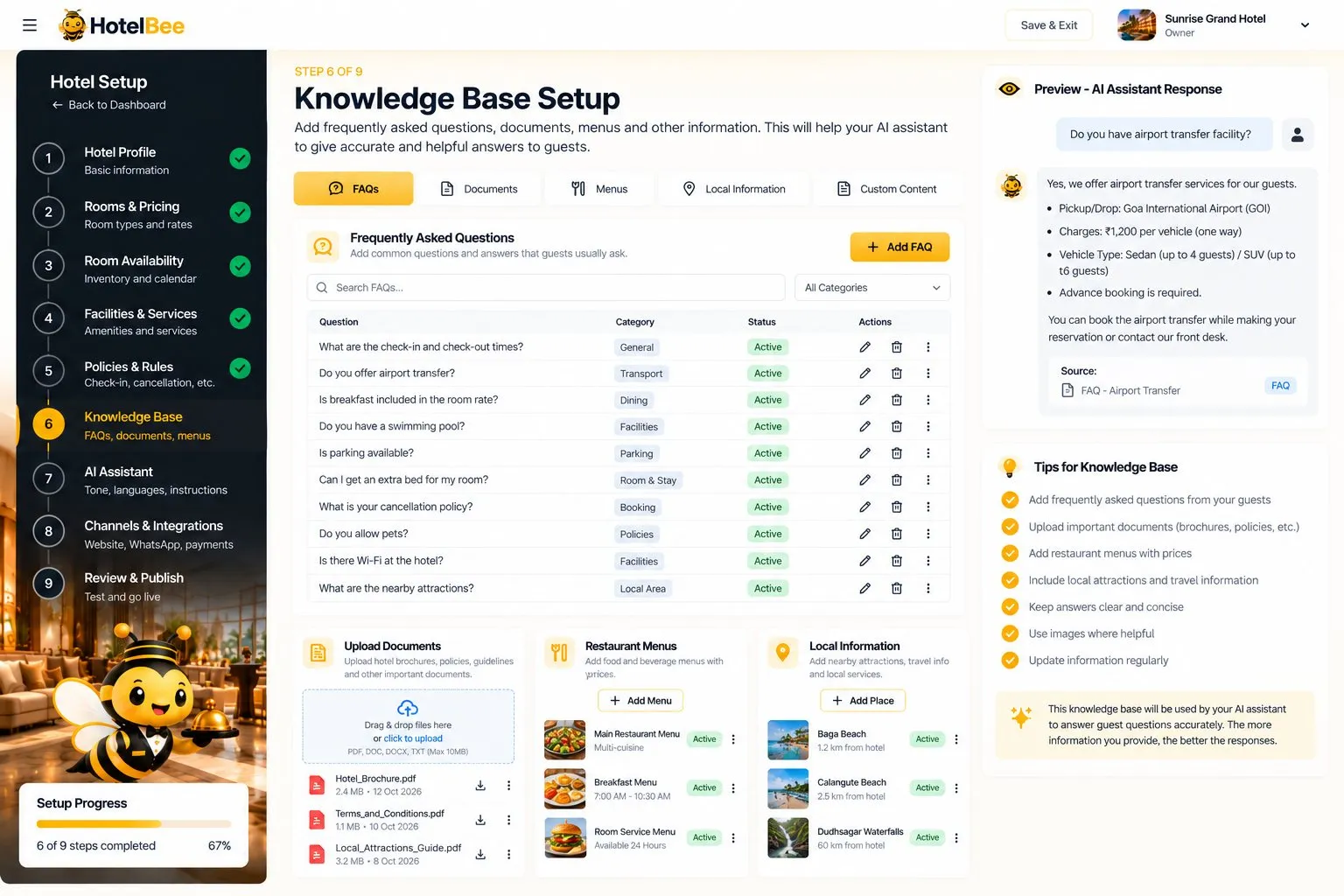
The knowledge base is where most everyday guest questions get their answers.
The principle: facts in, accurate answers out
Think of setting up an AI receptionist the way you’d brief a new front-desk hire on their first day. You wouldn’t tell them to make up room rates; you’d give them the rate card, the house rules and a list of common questions. The AI works the same way:
- Rooms, rates and availability come from structured data you enter, so prices and free rooms are always real.
- Policies and facilities come from forms, so answers about check-in, pets or the restaurant are consistent.
- Everything else — FAQs, menus, nearby places, notes and documents — goes into a knowledge base.
If a guest asks something your information doesn’t cover, a well-built AI says it isn’t sure and hands over to staff instead of guessing.
Step 1: 🏨 Hotel profile
Start with the basics: name, type of property, address, contact details, photos and a description. In HotelBee, this also becomes your public hotel page, so write the description for guests — what makes your property special, who it’s ideal for, what’s nearby.
Tip: use real, recent photos. Guests trust them more, and so does the booking decision.
Step 2: 🛏️ Rooms and pricing
For each room type, enter occupancy, beds, amenities, the base rate and photos. This is what the AI uses to quote prices and what the booking page uses to calculate totals.
Tip: name room types the way guests talk about them — “Deluxe Sea View” is clearer than “Type B”.
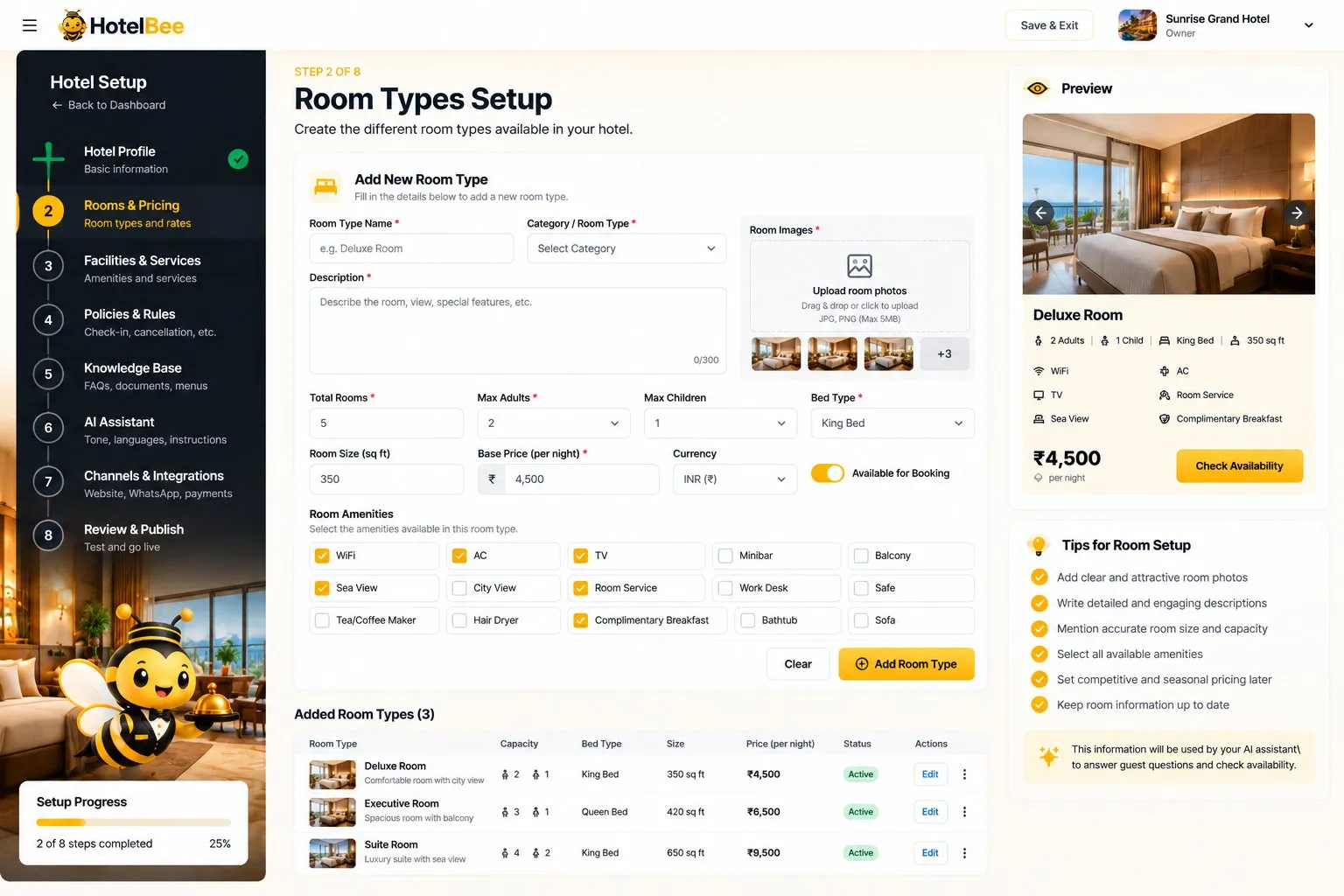
Room types with occupancy, beds, amenities and rates — the source of every price the AI quotes.
Step 3: 📅 Room availability
Set your room inventory and use the calendar to block dates or mark rooms under maintenance. The AI checks this live availability before it offers a room, so it never promises something you can’t provide.
Tip: make updating the calendar part of your daily routine, especially if you also sell rooms on booking sites.
Step 4: 🏊 Facilities and services
List your facilities — pool, restaurant, parking, spa, airport transfer and so on — with opening hours and whether they’re free or paid. These are among the most common guest questions.
Step 5: 📋 Policies and rules
Enter check-in and check-out times, cancellation rules, ID requirements, pet and children policies and payment rules. Clear policies prevent disputes, and the AI repeats them consistently every time.
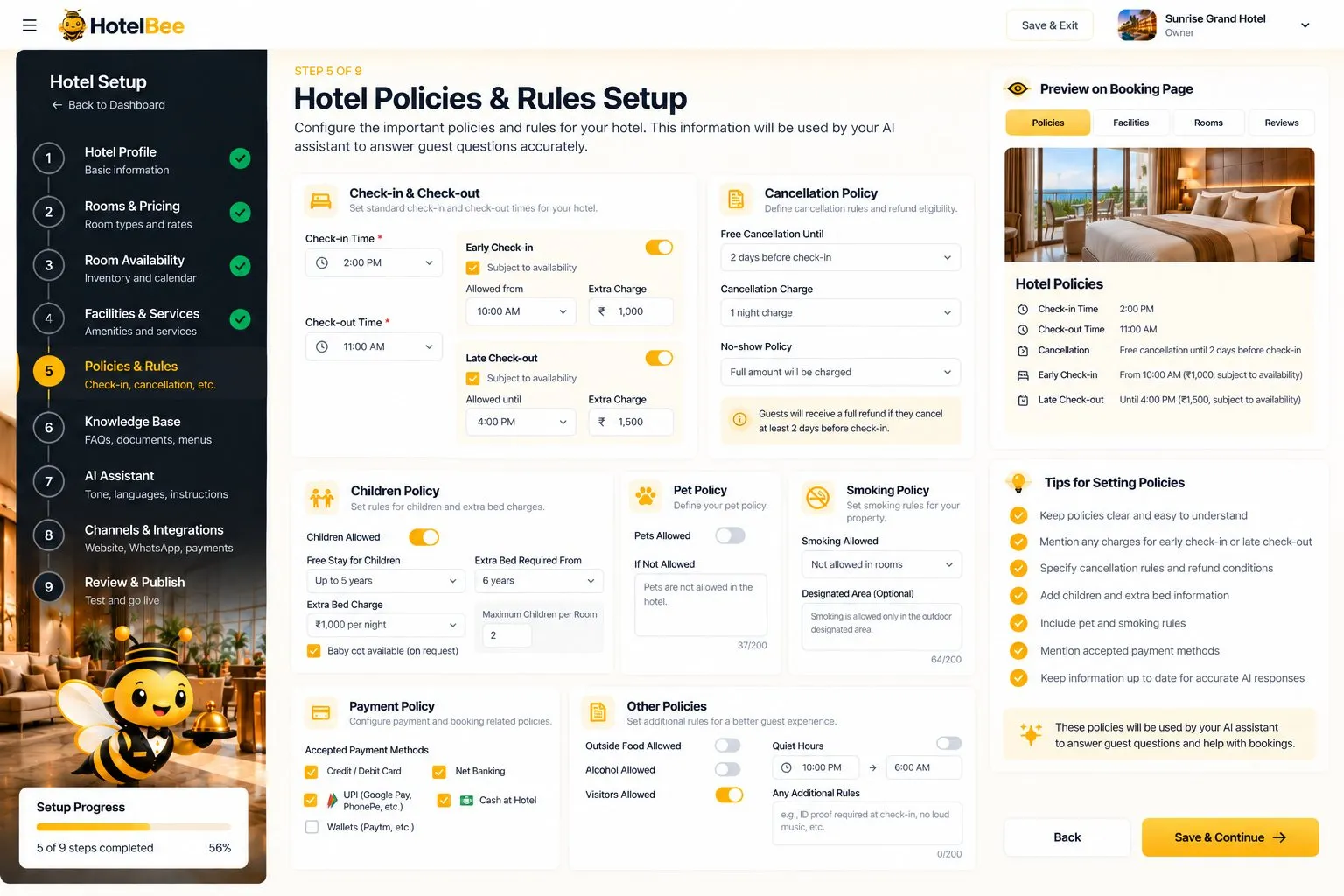
Policies and rules: the answers to “What time is check-in?” and “Can I cancel?”
Step 6: 📚 Knowledge base
This is where you cover everything else. HotelBee’s knowledge base has:
- ❓ FAQs — write the questions exactly as guests ask them, with short, clear answers.
- 🍽️ Menus with prices — restaurant, breakfast and room-service menus.
- 📍 Nearby places with distance — beaches, temples, stations, airports, markets.
- 🗒️ Custom notes — anything else your team usually explains.
- 📄 Uploaded documents — brochures, policy documents and guides.
How to find your FAQs: scroll through the last month of WhatsApp messages and emails, and note every question you answered more than twice. Those are your first twenty FAQs.
Step 7: 🤖 The AI assistant itself
Now shape how the assistant talks:
- Name and personality — what it calls itself and how it introduces your hotel.
- Tone — friendly, professional, warm, concise.
- Extra instructions — for example, “Always mention our free airport pickup for stays of three nights or more.”
- Languages — enable the languages your guests use.
- Allowed actions — what the AI may do, such as sharing booking links.
- Handoff rules — when to pass the chat to staff: special requests, large bookings, unhappy guests, refund questions.
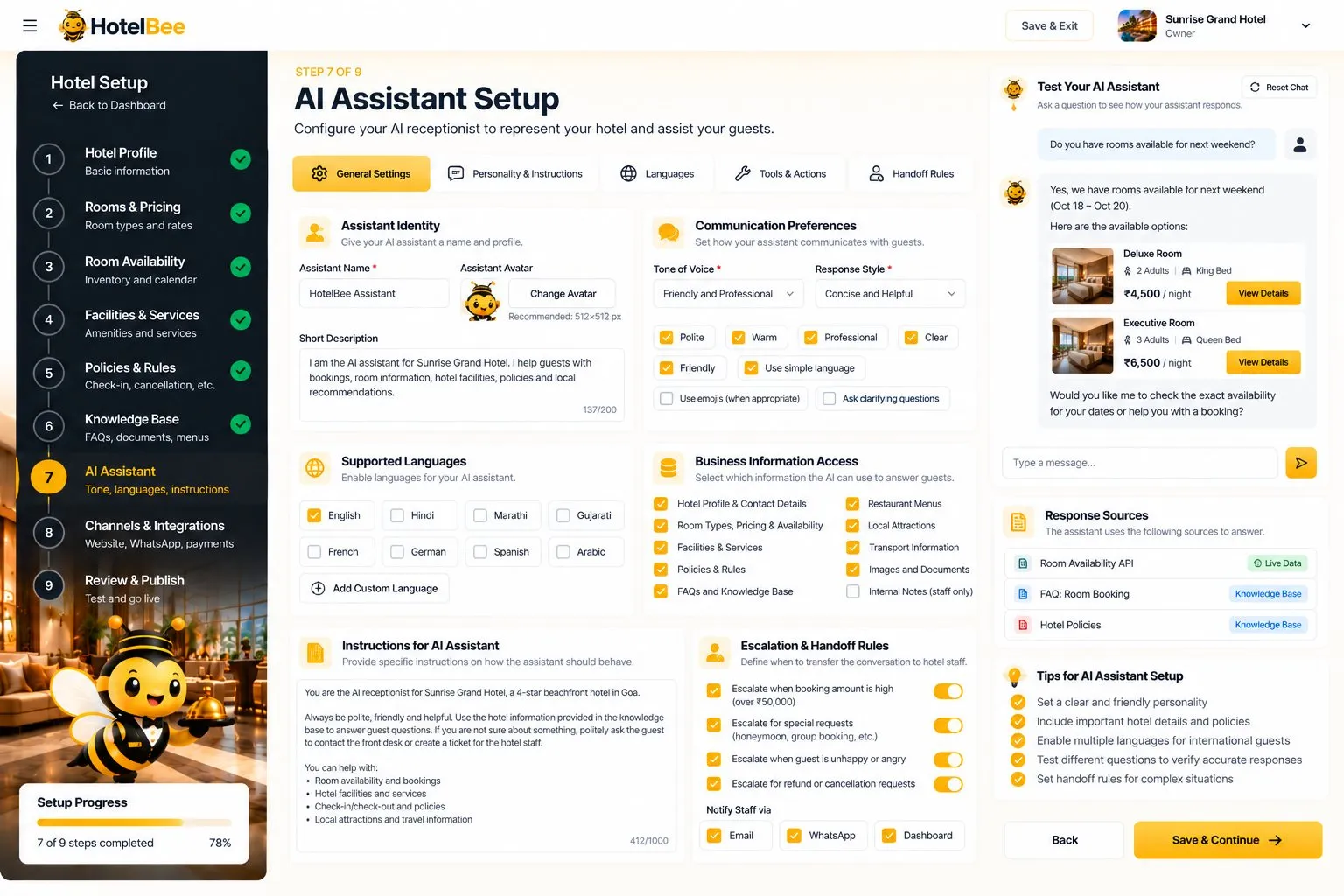
Tone, languages, information access and escalation rules — all in one screen.
Step 8: 🔌 Channels and integrations
Decide where the AI works and how guests book:
- Website chat widget — paste one line of code before
</body>on your website. - WhatsApp — request it here; the HotelBee team connects it on your own Meta account (paid add-on).
- Payment mode — pay at hotel, UPI to your own UPI ID, or online through your own Razorpay account.
- Booking mode — instant confirmation, or confirm each booking first.
Step 9: ✅ Review, test and publish
Before going live, HotelBee shows a checklist and a test chat. Use it properly — ask the questions real guests ask, including the awkward ones:
- “Is breakfast included in the Deluxe room?”
- “Can I check in at 9 am?”
- “Do you have anything cheaper next weekend?”
- “Can I bring my dog?”
- “How far is the railway station?”
If an answer is wrong or vague, fix the underlying information — the room, the policy or an FAQ — and test again. When you’re happy, press Publish to put your hotel page and chat widget live.
Keeping the AI accurate over time
- 🔄 Update rates and availability as they change.
- ➕ Add an FAQ whenever staff answer a new question twice.
- 👀 Review handed-over chats weekly — they show what the AI doesn’t know yet.
- 🗓️ Refresh seasonal content — menus, events and local tips.
You can return to the setup wizard at any time to edit any step.
Getting started
HotelBee gives every new hotel a 14-day free trial with all features, and you can sign up with email or Google in about a minute.


