WhatsApp for Business
How to Send Bulk WhatsApp Messages Without Getting Your Number Banned
Bulk WhatsApp messages can bring customers back — or get your number blocked. Here’s the safe, official way to send offers to hundreds of customers.
By 7CRM Team9 min read
A festival sale, a new arrival, a fee reminder — some messages need to reach hundreds of customers at once. WhatsApp is where those customers actually read them. But send bulk messages the wrong way and the result isn’t more sales; it’s a blocked number and a customer list you can no longer reach.
Here is how to send bulk WhatsApp messages safely and officially, step by step.
Why business numbers get banned
WhatsApp restricts numbers that look like spam. The usual causes:
- Unofficial bulk-sender tools and modified WhatsApp apps that automate the normal app.
- Messaging people who never agreed to hear from you.
- Many customers blocking or reporting your messages.
- Sending huge volumes from a brand-new number all at once.
Every safe method avoids all four.
The safe way: the official WhatsApp Business Platform
Meta’s WhatsApp Business Platform (the Cloud API) is built for businesses that message customers at scale. Bulk messages sent through it use message templates that Meta has approved, go only to customers who opted in, and are tracked message by message.
You don’t need to write code to use it. Platforms such as WhatsAppBee connect your number to the official platform and give you a campaign screen instead.
| Unofficial bulk sender | Official platform (e.g. WhatsAppBee) | |
|---|---|---|
| How it sends | Automates the normal WhatsApp app | Meta’s Cloud API |
| Risk to your number | High | Low when you follow the rules |
| Message format | Anything | Meta-approved templates |
| Personalisation | Limited | Variables such as the customer’s name |
| Tracking | Little or none | Sent, delivered, read, replied, failed |
Step 1: Collect opt-in first
Promotional messages may only go to customers who have opted in. Ask in ways customers recognise:
- a tick box on your website or billing form: “Send me offers on WhatsApp”;
- a QR code at the counter that opens a chat with your number;
- a staff question at checkout, recorded in your contact list.
Record the opt-in against each contact. WhatsAppBee stores opt-in status for every contact and sends promotions only to opted-in customers.
Step 2: Clean and segment your list
One message to everyone is the fastest way to get blocked. Send each offer to the people it fits:
| Segment | Example message |
|---|---|
| Previous buyers | Early access to the festive sale |
| New leads | Welcome offer on first purchase |
| VIP customers | Private preview before the public launch |
| Inactive for 90 days | “We miss you” discount |
Contact management with tags, custom fields and saved segments makes this a two-minute job.
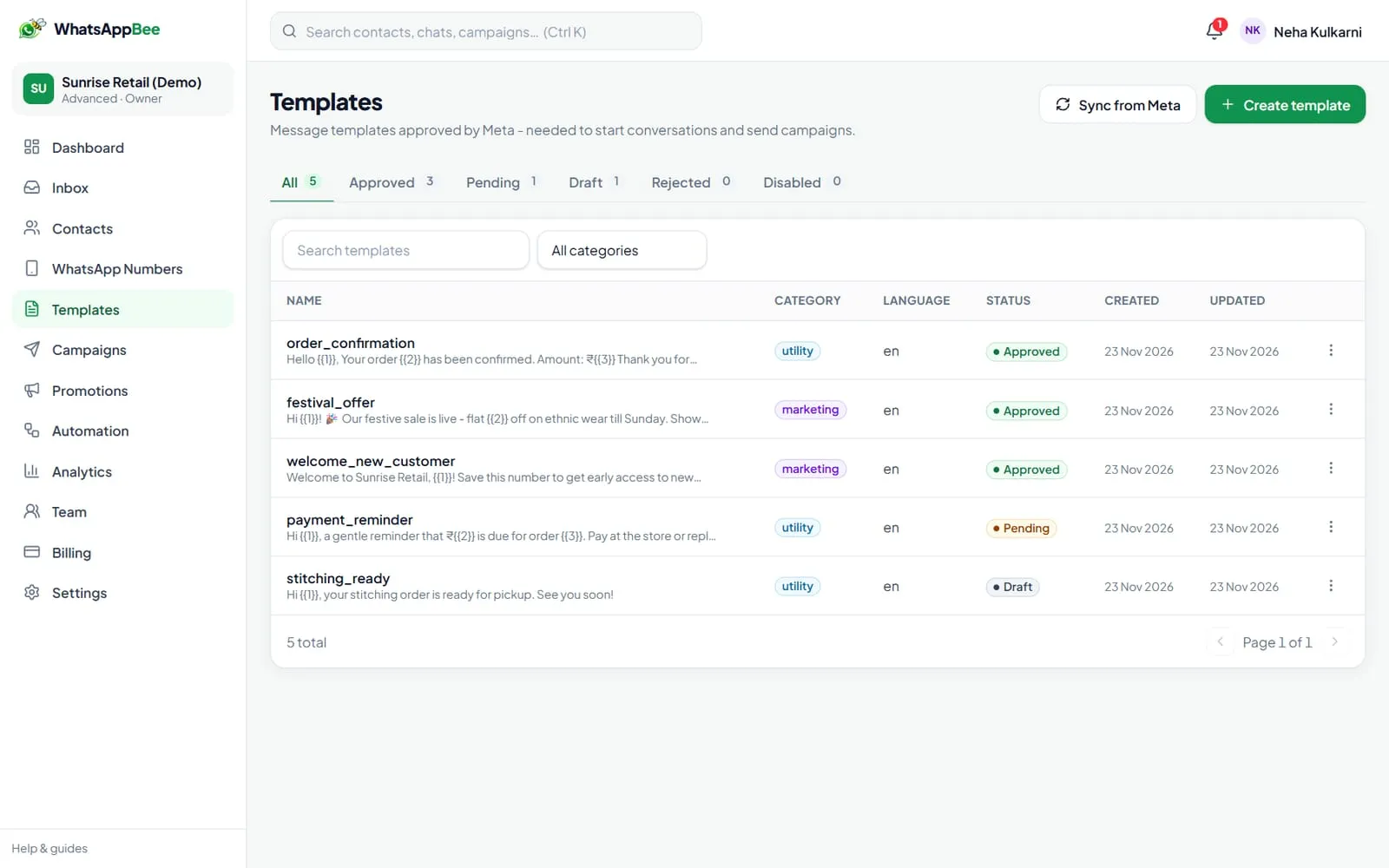
Step 3: Write a template Meta will approve
Bulk messages use templates. A good marketing template:
- says who you are in the first line;
- uses a variable for the customer’s name: “Hi {{1}}”;
- has one clear offer and one action (“Reply YES to reserve”, or a button);
- avoids ALL CAPS, misleading urgency and too many emoji.
Meta reviews every template and decides on approval — no software can guarantee it.
Step 4: Send at a sensible time and speed
- Time: send when customers are free to read — late morning or early evening usually works better than 7 am or midnight.
- Speed: choose a steady sending speed rather than blasting everything at once.
- New numbers: WhatsApp limits how many customers a new number can message in a day, and raises the limit as you send good-quality messages. Build up gradually.
In WhatsAppBee you can send now or schedule, pick the sending speed, and pause or cancel if something looks wrong.
Step 5: Watch the results — and your quality rating
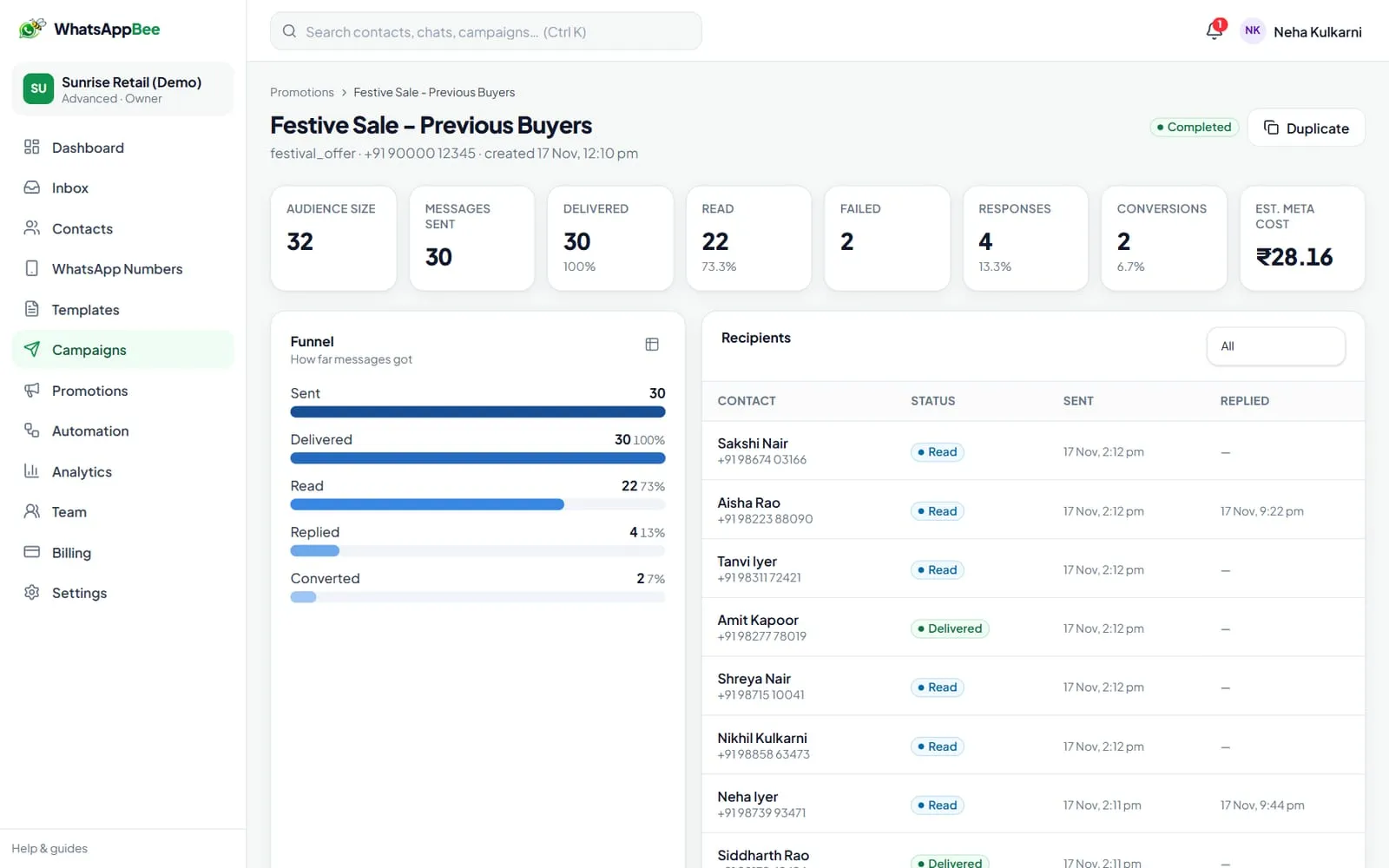
After every campaign, check:
| Metric | What it tells you |
|---|---|
| Delivered | How many numbers received it |
| Read | Whether the message got attention |
| Replied | Whether the offer started conversations |
| Failed | Bad numbers to clean from your list |
WhatsApp also gives each business number a quality rating (green, yellow or red) based on how customers react. Lots of blocks push it down. Fewer, better-targeted campaigns keep it green.
Step 6: Have someone ready to reply
A good campaign creates replies: “Is it available in blue?”, “What’s the price?”. If nobody answers, the campaign is wasted. Route replies into a shared team inbox and set up keyword auto-replies for the common questions.
Bulk WhatsApp checklist
- Number on the official WhatsApp Business Platform.
- Opt-in recorded for every contact you’ll message.
- Audience segmented — no “send to all” by default.
- Approved template with the customer’s name and one clear action.
- Sensible time and sending speed.
- Team ready to answer replies.
- Results checked and failed numbers cleaned.
Frequently asked questions
Is bulk WhatsApp messaging legal in India?
Sending business messages to customers who opted in, through the official WhatsApp Business Platform, follows WhatsApp’s rules. Messaging people who didn’t agree, or using unofficial tools, breaks them.
How much does it cost to send bulk WhatsApp messages?
Meta charges for template messages by category (marketing, utility, authentication), separately from any software subscription. Rates change, so check Meta’s current pricing. WhatsAppBee shows an estimated Meta cost for each campaign.
Can I send bulk WhatsApp messages from the WhatsApp Business app?
The app’s broadcast lists reach only contacts who have saved your number, in small lists. For hundreds of customers with tracking, use the WhatsApp Business Platform. See WhatsApp Business app vs API.
Send your first safe campaign
WhatsAppBee sends approved templates to opted-in contacts, tags or segments, with scheduling and per-customer tracking, on the official WhatsApp Business Platform. Read about bulk WhatsApp campaigns or start the free trial.