WhatsApp for Business
The WhatsApp 24-Hour Rule Explained: Customer Service Window and Templates
Why can’t your team reply to a customer from yesterday? It’s the WhatsApp 24-hour rule. Here’s how the customer service window works — and how templates get around it.
By 7CRM Team7 min read
A customer asks about a product on Monday evening. Your team sees it on Wednesday morning, types a reply — and it won’t send. Nothing is broken. That’s the WhatsApp 24-hour rule, and every business on the WhatsApp Business Platform needs to understand it.
What is the WhatsApp 24-hour rule?
On the WhatsApp Business Platform, every time a customer messages you, a 24-hour customer service window opens.
- Inside the window: you can reply freely — text, emoji, photos, videos, documents, location.
- Outside the window: you can only send a message template that Meta has approved. When the customer replies to it, a new 24-hour window opens.
The window restarts from the customer’s latest message, not their first.
Why does WhatsApp have this rule?
It protects customers from unwanted messages. Businesses can talk freely while the customer is engaged; after that, only pre-approved, structured messages are allowed. It’s one reason WhatsApp stays a channel people actually read.
Inside vs outside the window
| Inside 24 hours | Outside 24 hours | |
|---|---|---|
| Free-text replies | Yes | No |
| Photos, documents, location | Yes | Only within an approved template |
| Approved templates | Yes | Yes — the only option |
| Typical use | Answering questions, sharing details | Reminders, updates, offers, restarting a chat |
A worked example
| Time | What happens | Window |
|---|---|---|
| Mon 7:00 pm | Customer: “Is the blue kurta in size M?” | Open until Tue 7:00 pm |
| Mon 7:20 pm | Team: “Yes! ₹799. Shall I keep one aside?” | Still open |
| Tue 9:00 am | Customer: “Yes please, I’ll come Saturday.” | Restarts — open until Wed 9:00 am |
| Thu 10:00 am | Team wants to send a reminder | Closed — use a template |
| Thu 10:00 am | Template: “Hi Priya, your kurta is reserved till Saturday. Reply to confirm.” | Customer replies → window reopens |
How templates restart a conversation
A template is a pre-written message Meta reviews and approves, with variables for personal details:
Hi {{1}}, a gentle reminder that ₹{{2}} is due for order {{3}}. Pay at the store or reply to this message.
Templates come in three categories — marketing (offers), utility (order and account updates) and authentication (one-time codes). Meta decides on approval and prices each category differently.
What the 24-hour rule means for your team
- Reply fast. Most questions answered within the first hour never hit the limit. A shared team inbox with assignments keeps chats from waiting.
- Keep a few utility templates ready — “we’re following up on your enquiry”, payment reminder, order ready — so anyone can restart a chat in one click.
- Use automation carefully. Free-text auto replies only work inside the window; workflow steps that run later must use templates. See WhatsApp auto reply for business.
- Don’t try to work around it with personal numbers or unofficial tools — that’s how numbers get banned.
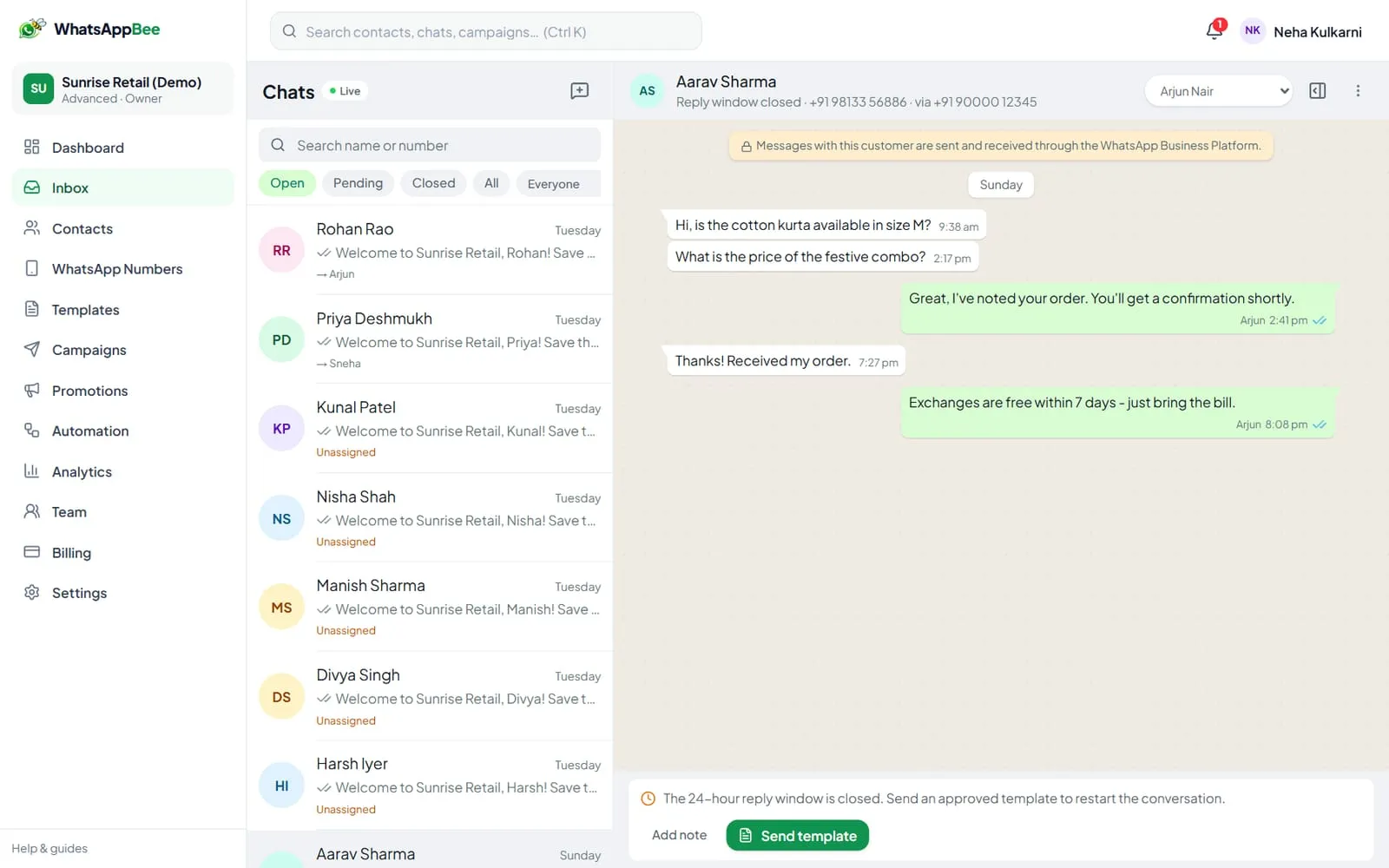
In WhatsAppBee the inbox shows when a chat’s reply window has closed and offers Send template instead of the normal reply box, so nobody wastes time typing a message that can’t be sent.
Does the 24-hour rule apply to the WhatsApp Business app?
No. The free WhatsApp Business app on your phone doesn’t use this window. It applies to the WhatsApp Business Platform (API), which team inboxes and campaign tools use. Compare both in WhatsApp Business app vs API.
How the window affects cost
Meta charges for messages by category. Service replies inside the window are treated differently from template messages, and template prices depend on the category (marketing, utility, authentication). Pricing rules change from time to time, so check Meta’s current WhatsApp pricing for India before planning a large campaign.
Frequently asked questions
Can I send a message after 24 hours on WhatsApp Business API?
Yes, but only an approved message template. Once the customer replies, you can chat freely again for 24 hours.
Does the 24-hour window start from my message or the customer’s?
From the customer’s latest message. Your own messages don’t reopen it.
What happens if my template is rejected?
Edit it and submit again — common reasons are unclear wording, missing context for variables or content that breaks WhatsApp’s policies. Meta makes the final decision.
Never get stuck outside the window
WhatsAppBee shows the reply window on every chat, keeps your approved message templates one click away, and tracks Meta approval for each. Start the free trial.