WhatsApp for Business
WhatsApp Auto Reply for Business: Keyword Replies and Workflows (with Examples)
The same five questions arrive on WhatsApp every day. Here’s how to answer them automatically — from simple away messages to keyword replies and multi-step workflows.
By 7CRM Team8 min read
“What’s the price?” “What time do you open?” “Where is the shop?” “Is it available?” Every business on WhatsApp answers the same handful of questions again and again. Each one takes a minute — and when the team is busy, customers wait or leave.
WhatsApp auto replies answer those questions instantly, day and night, so your team can spend its time on the chats that actually need a person.
Three levels of WhatsApp auto reply
| Level | What it does | Where you get it |
|---|---|---|
| 1. Greeting and away messages | One fixed reply when a chat starts or when you’re closed | WhatsApp Business app |
| 2. Keyword auto-replies | A different reply for each keyword: PRICE, TIMINGS, LOCATION | Platforms on the WhatsApp Business Platform, such as WhatsAppBee |
| 3. Multi-step workflows | Reply, wait, check, assign to a team member | Platforms such as WhatsAppBee |
The free app covers level 1. Levels 2 and 3 need the official WhatsApp Business Platform.
Level 1: Greeting and away messages
Keep them short and useful:
Greeting: Hi! Thanks for messaging Sunrise Retail. Send PRICE for our price list, TIMINGS for store hours, or type your question and our team will reply.
Away: We’re closed right now (open 10 am – 9 pm). Leave your question and we’ll reply first thing tomorrow.
Level 2: Keyword auto-replies
A keyword auto-reply watches incoming messages for a word and sends the matching answer.
Step 1: List your most-asked questions
Scroll through last month’s chats and count. For most small businesses the top five cover over half of all messages.
Step 2: Pick simple keywords — and their variations
| Question | Keywords | Auto reply |
|---|---|---|
| Price | PRICE, PRICES, RATE | Price list or link |
| Timings | TIMINGS, OPEN, HOURS | Opening hours |
| Location | LOCATION, ADDRESS, MAP | Address and map location |
| Offers | OFFER, SALE, DISCOUNT | Current offer |
| Human help | AGENT, CALL, HELP | “Connecting you to our team” + assign the chat |
Customers don’t type exactly what you expect, so add variations (PRICE, PRICES, RATE) and match on “contains word” rather than exact text.
Step 3: Write replies that end with a next step
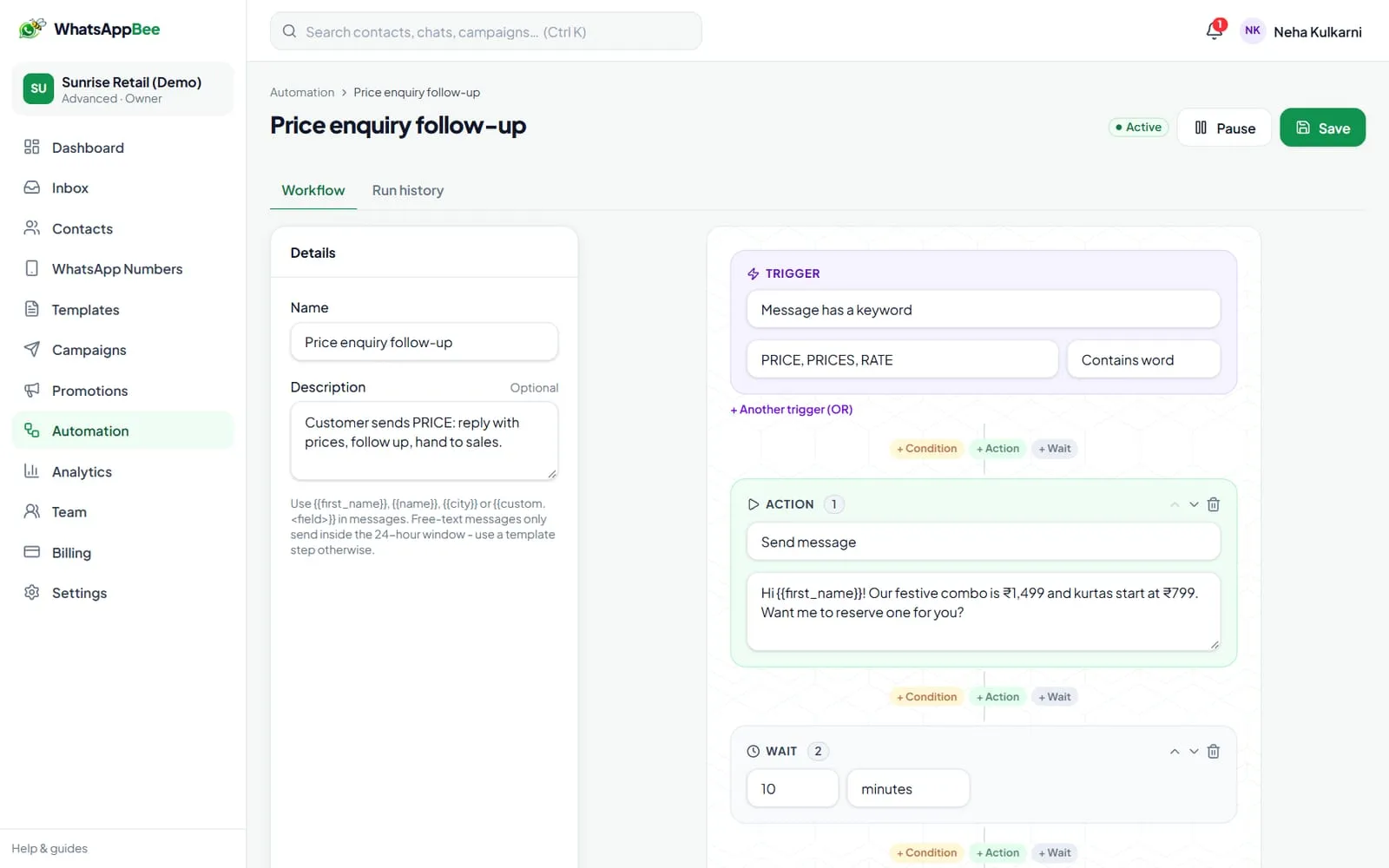
Hi {{first_name}}! Our festive combo is ₹1,499 and kurtas start at ₹799. Want me to reserve one for you?
A question at the end turns an automatic answer into a conversation your team can close.
Level 3: Multi-step workflows
Workflows chain several steps together. A real example from a retail store:
- Trigger: message contains PRICE, PRICES or RATE.
- Action: send the price reply above.
- Wait: 10 minutes.
- Condition: is it within business hours?
- Action: assign the chat to a salesperson so a person follows up.
Outside business hours the workflow stops at step 4, and the chat waits in the inbox for the morning shift.
Other useful workflows:
- Welcome new contacts — a template message when a contact is added.
- Route by topic — “complaint” goes to the manager, “order” goes to sales.
- Business events — an order created in your own system (sent through the API) triggers an order confirmation.
Rules auto replies must follow
- The 24-hour window. Free-text automatic replies only go within 24 hours of the customer’s last message; after that, a workflow step must use an approved template. See the WhatsApp 24-hour rule explained.
- Opt-in for promotions. An automatic offer is still a promotion — send it only to opted-in contacts.
- Always offer a human. Include a keyword such as AGENT, and make sure someone watches the shared inbox.
Auto reply vs AI chatbot
Keyword automation follows the rules you set: the same keyword always gets the same answer, which makes it predictable and easy to control. An AI chatbot writes its own answers. WhatsAppBee automations are rule-based — AI chatbot replies are not available in WhatsAppBee. (For hotels, 7CRM’s HotelBee offers an AI receptionist.)
Frequently asked questions
How do I set an auto reply on WhatsApp Business?
In the WhatsApp Business app, use the greeting and away message settings. For keyword replies and workflows, use a platform on the WhatsApp Business Platform such as WhatsAppBee.
Can WhatsApp auto reply to specific keywords?
Not in the free app. On the WhatsApp Business Platform, tools such as WhatsAppBee send a different reply for each keyword, such as PRICE or TIMINGS.
Will auto replies annoy customers?
Not if they answer the question asked and offer a way to reach a person. Annoyance comes from irrelevant replies and no human option.
Set up your first keyword reply
WhatsAppBee lets you build keyword auto-replies and multi-step workflows with waits and auto-assignment, on the official WhatsApp Business Platform. Read about WhatsApp automation or start the free trial.