BrokerBee · Agreements & Documents
Rental Agreement Workflow and Document Tracking
After a deal, brokers spend days collecting Aadhaar, PAN, photos and property papers, then chasing the agreement and police verification. BrokerBee tracks that whole workflow without pretending to replace government or legal portals.
Define which documents each agreement type needs, upload and verify them, upload the final government agreement PDF once it’s executed externally, and track police verification until the agreement is complete.
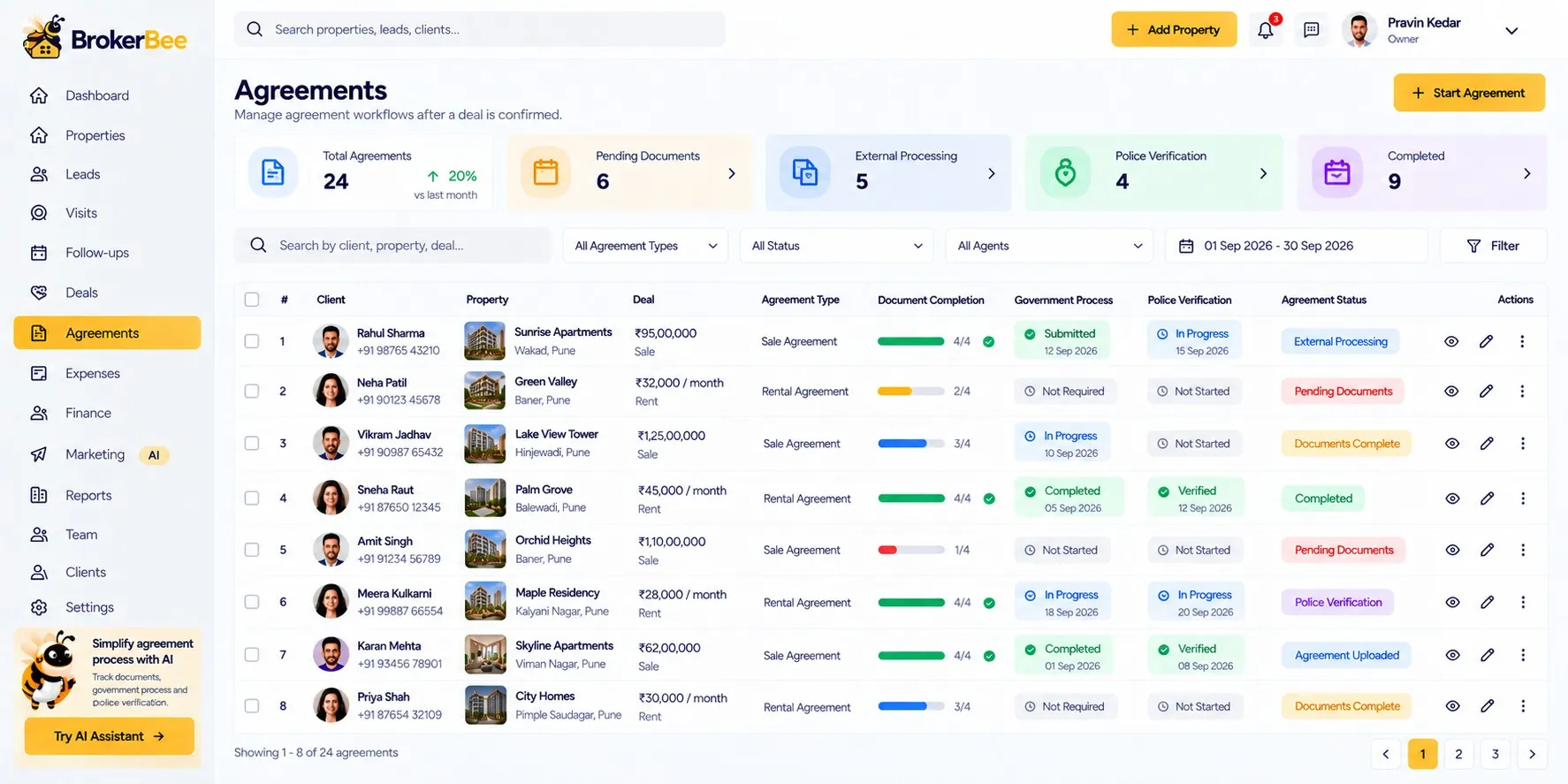
BrokerBee is in development. This page describes the product we are building; features and timelines may change before launch.
Capabilities
Agreements & Documents in BrokerBee
Document checklists
Required and optional documents per agreement type, e.g. tenant and owner Aadhaar, PAN, photos.
Uploads & verification
Statuses: required, pending, uploaded, verified, rejected, expired.
Final agreement PDF
Store the executed government agreement against the deal.
Police verification
Track police verification status to completion.
Private, secure storage
Private URLs, file validation and an audit history for every document.
Missing document alerts
Dashboard alerts for agreements missing documents.
How it works
Step by step
- 1
Deal confirmed
An agreement record is created.
- 2
Collect documents
Follow the checklist and verify uploads.
- 3
Execute externally
Complete the government/legal process as usual.
- 4
Upload & close
Add the final PDF and police verification status.
Benefits
Why it matters
Nothing missed
Checklists show exactly what’s outstanding.
Organised records
Every deal’s paperwork in one secure place.
Privacy respected
Sensitive documents are never public.
Faster handover
Clients move in sooner when paperwork runs smoothly.
FAQ
Frequently Asked Questions
Does BrokerBee register agreements with the government?
No. The official agreement and police verification happen on the government/legal portals as usual; BrokerBee tracks the process and stores the documents.
Can I set which documents are required?
Yes. Required and optional documents are configurable per agreement type.
Who can see uploaded documents?
Only authorised team members. Documents use private, signed links and are never shown on public property pages.
Ready to grow your real estate business?
Join the BrokerBee early-access list and help shape the product.